

Tematom Station — Limited Version of the System
DESCRIPTION
Tematom Station is a component of the experimental engineering platform Tematom, designed to demonstrate real interaction between physical sensors, local software, and an AI assistant. The program continuously retrieves data from sensor.tematom.com where live readings from the physical ESP32 Edge Station are published.
The sensor is physically located in Burgas, Bulgaria, and transmits temperature, humidity, and a GMT-based timestamp.Tematom Station downloads these data every 10 seconds and saves them to a local data file. The auxiliary module Tematom Bridge then passes the latest available dataset to the installed Chrome Extension, which connects the user, the program, and the AI assistant. When triggered, the extension delivers a structured JSON package directly into the chat input field:
[10.11.2025, 12:31:17] { "data": { "status": "ok", "data": { "temperature": 23.9,"humidity": 55.4,"ts": "2025-11-10T07:28:08Z","ts_ms":1762759688000} }}
Where:
- The first timestamp (
10.11.2025, 12:31:17) is the user’s local time; temperatureandhumidity— real sensor readings;ts— measurement time in GMT;ts_ms— timestamp in milliseconds.
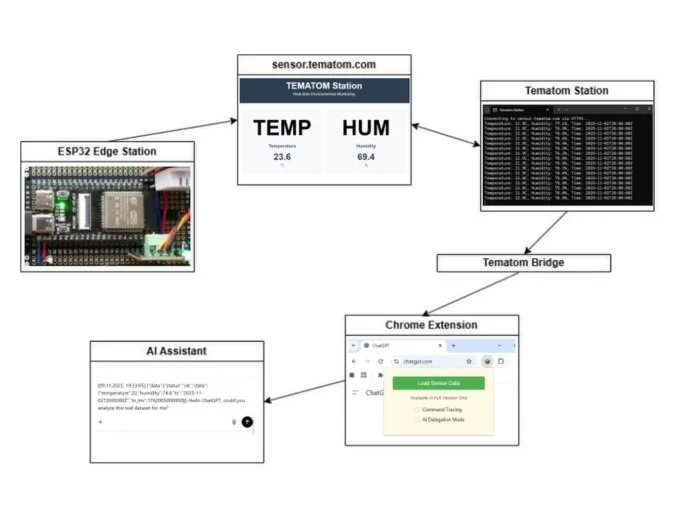
Operation Principles
- The program does not require registration and does not transmit any personal data.
- All server interactions are read-only — no data are ever written back to the site.
- Retrieved values are stored locally and can be analyzed by the user or an AI assistant.
- A stable Internet connection is required for real-time operation.
Data Handling Policy
Tematom Station does not collect or transmit personal information. All values received from sensor.tematom.com are demonstration readings only. Special attention is given to data accuracy and traceability — each record includes an independent timestamp, data source, and status flag (
status: ok / error).Availability and License
This limited version is provided free of charge and without usage restrictions. Parts of the source code are available on GitHub under the MIT License. Developers are welcome to create their own daemon, replace Tematom Station, or connect custom hardware to the system.
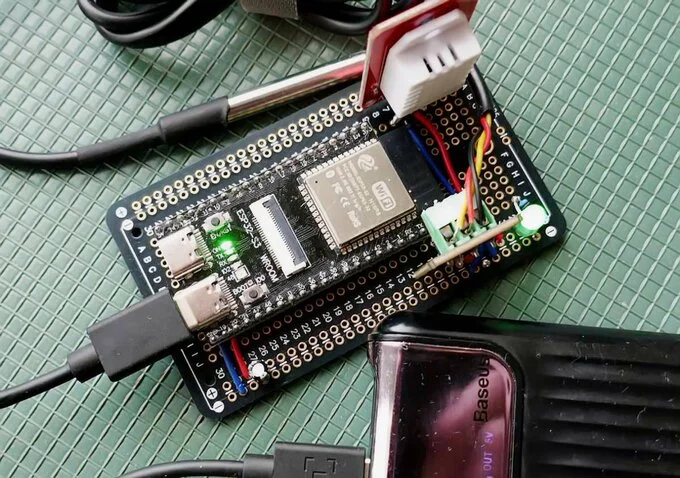
ESP32-S3 EDGE STATION
The device is based on the ESP32-S3 WROOM core module. It integrates two environmental sensors for data acquisition. A waterproof DS18B20 digital temperature sensor on a cable provides temperature readings. A high-precision DHT22 (AM2302) humidity sensor, compatible with the Arduino OKY3070 module, is used to measure ambient humidity.
Only humidity data is utilized from this sensor.The system firmware is developed using the Arduino framework. The entire hardware module maintains full compatibility with the Arduino ecosystem.
The station operates autonomously, powered either by a standard PowerBank or a stabilized external power supply. It does not require a connected computer for operation.
The device connects to a Wi-Fi network and transmits the collected temperature and humidity data to the remote server at sensor.tematom.com. Data transmission is secured using an authentication key protocol. Time-synced via NTP server - transmits data in GMT/UTC timezone.
The measurement and transmission cycle is executed at a fixed interval of every 10 seconds, ensuring timely updates of the environmental conditions on the web platform.
INSTALLATION
The Tematom software package consists of two essential components: the Tematom Station desktop application and the Chrome Extension. Both modules must be installed — they work only together.
1. Tematom Station
Download and run the installer. If you experience issues with direct download, you can obtain TematomSetup.v1.0.exe from our GitHub repository. The installer will place the program in the folder
C:\Tematom and create a shortcut on your desktop. Administrator rights are required — the installer will automatically register the application in the system registry. Once installed, start Tematom Station to view the live data stream coming from our ESP32 Edge Station.2. Chrome Extension
We are verified developers in the Chrome Web Store. Click the Extension button below to install the trusted Tematom Chrome Extension directly from the store. After installation, the extension will automatically connect to your local Tematom Station. Use the “Load Sensor Data” button inside the chat with your AI assistant to insert real sensor readings.
⚙️ Tip:
If ChatGPT does not process the data correctly, enable Developer Mode in your OpenAI account settings.
If ChatGPT does not process the data correctly, enable Developer Mode in your OpenAI account settings.
Download installer
Extension